Outcome
Your rental or hotel rate comps support the subject's rents with the right metric for the property type.
Navigation path
Document wizard > Rental Comparables or Hotel Rate Comps
Access
A document that includes Rental Comparables
On this page
Before you start
Data, sources, and access to prepare
- Verified asking or achieved rent research
- Comparable property facts
- For hotel comps, ADR and occupancy
Use the property-specific branch
Rental evidence by asset
The same comparable editor changes its key metrics for hotels and unit-based properties.
Market evidence
Verify property and pricing facts
Commercial
Market rent and rent per SF
Unit-based
Rent per unit
Hospitality
ADR, occupancy, and RevPAR
Comparable page
Ordered evidence set
- Market evidenceCommercial
- Market evidenceUnit-based
- Market evidenceHospitality
- CommercialComparable page
- Unit-basedComparable page
- HospitalityComparable page
Commercial rental
- Primary entries
- Market rent and SF
- Calculated or summarized result
- Average rent per SF when inputs support it
Unit-based rental
- Primary entries
- Market rent and units
- Calculated or summarized result
- Average rent per unit
Hotel Rate Comp
- Primary entries
- ADR and occupancy
- Calculated or summarized result
- RevPAR equals ADR x occupancy
Complete research fields
Name and Address Recommended
Comparable identity and location.
- Format
- Plain-text name and postal address
- Units
- Not applicable
- Save behavior
- Saved when the Rental Comparable form Save action succeeds.
- Downstream effect
- Identifies and locates the record on the applicable Rental Comparables or Hotel Rate Comps page.
Market Rent Recommended
Observed asking or achieved rent used by non-hotel rental comps.
- Format
- Currency amount in the source basis
- Units
- Property-appropriate rent basis
- Save behavior
- Saved when the Rental Comparable form Save action succeeds.
- Downstream effect
- Feeds the non-hotel rent presentation and applicable per-SF or per-unit summary.
ADR Recommended
Hotel Average Daily Rate.
- Format
- Currency amount
- Units
- Currency per occupied room per day
- Save behavior
- Saved when the Hotel Rate Comparable form Save action succeeds.
- Downstream effect
- Combines with occupancy to recalculate comparable RevPAR.
Occupancy Recommended
Hotel occupied-room percentage.
- Format
- Percentage
- Units
- Percent of available rooms
- Save behavior
- Saved when the Hotel Rate Comparable form Save action succeeds.
- Downstream effect
- Combines with ADR to recalculate comparable RevPAR.
RevPAR Calculated
ADR multiplied by occupancy.
- Format
- Read-only calculated currency
- Units
- Currency per available room per day
- Save behavior
- No direct entry. Recalculates automatically from the comparable ADR and occupancy.
- Downstream effect
- Displays the normalized hotel-rate result on the comparable card and Hotel Rate Comps summary.
SF, Units, Rooms, Bedrooms, or Unit Mix Recommended
Context and denominators used by the property-specific presentation.
- Format
- Nonnegative numeric facts and property-specific mix detail
- Units
- Square feet, units, rooms, bedrooms, or mix counts
- Save behavior
- Saved when the Rental Comparable form Save action succeeds.
- Downstream effect
- Supplies the context and denominators for property-specific rental comparison output.
Description and Photo Optional
Optional context and visual identification.
- Format
- Plain text up to 300 characters; JPEG, PNG, or WebP under 25 MB
- Units
- Not applicable for text; file for image
- Save behavior
- Saved with the comparable after the supported image upload and form Save succeed.
- Downstream effect
- Adds reader-facing context and visual identification without changing calculated metrics.
Name and Address
- Requirement
- Recommended
- What it means
- Comparable identity and location.
- Format
- Plain-text name and postal address
- Units
- Not applicable
- Save behavior
- Saved when the Rental Comparable form Save action succeeds.
- Downstream effect
- Identifies and locates the record on the applicable Rental Comparables or Hotel Rate Comps page.
Market Rent
- Requirement
- Recommended
- What it means
- Observed asking or achieved rent used by non-hotel rental comps.
- Format
- Currency amount in the source basis
- Units
- Property-appropriate rent basis
- Save behavior
- Saved when the Rental Comparable form Save action succeeds.
- Downstream effect
- Feeds the non-hotel rent presentation and applicable per-SF or per-unit summary.
ADR
- Requirement
- Recommended
- What it means
- Hotel Average Daily Rate.
- Format
- Currency amount
- Units
- Currency per occupied room per day
- Save behavior
- Saved when the Hotel Rate Comparable form Save action succeeds.
- Downstream effect
- Combines with occupancy to recalculate comparable RevPAR.
Occupancy
- Requirement
- Recommended
- What it means
- Hotel occupied-room percentage.
- Format
- Percentage
- Units
- Percent of available rooms
- Save behavior
- Saved when the Hotel Rate Comparable form Save action succeeds.
- Downstream effect
- Combines with ADR to recalculate comparable RevPAR.
RevPAR
- Requirement
- Calculated
- What it means
- ADR multiplied by occupancy.
- Format
- Read-only calculated currency
- Units
- Currency per available room per day
- Save behavior
- No direct entry. Recalculates automatically from the comparable ADR and occupancy.
- Downstream effect
- Displays the normalized hotel-rate result on the comparable card and Hotel Rate Comps summary.
SF, Units, Rooms, Bedrooms, or Unit Mix
- Requirement
- Recommended
- What it means
- Context and denominators used by the property-specific presentation.
- Format
- Nonnegative numeric facts and property-specific mix detail
- Units
- Square feet, units, rooms, bedrooms, or mix counts
- Save behavior
- Saved when the Rental Comparable form Save action succeeds.
- Downstream effect
- Supplies the context and denominators for property-specific rental comparison output.
Description and Photo
- Requirement
- Optional
- What it means
- Optional context and visual identification.
- Format
- Plain text up to 300 characters; JPEG, PNG, or WebP under 25 MB
- Units
- Not applicable for text; file for image
- Save behavior
- Saved with the comparable after the supported image upload and form Save succeed.
- Downstream effect
- Adds reader-facing context and visual identification without changing calculated metrics.
Required means the field is needed to complete or support this workflow. Some screens allow a draft to save before every required item is complete. The steps and troubleshooting call out controls the product actively blocks.
Build the evidence set
Rental comparable steps
- 1
Open the correct step
Wizard navigation
Open Rental Comparables. Hospitality documents label the step Hotel Rate Comps.
Expected result: The editor displays property-appropriate fields.
If this step does not work
Confirm the subject property type if the label or metrics are wrong.
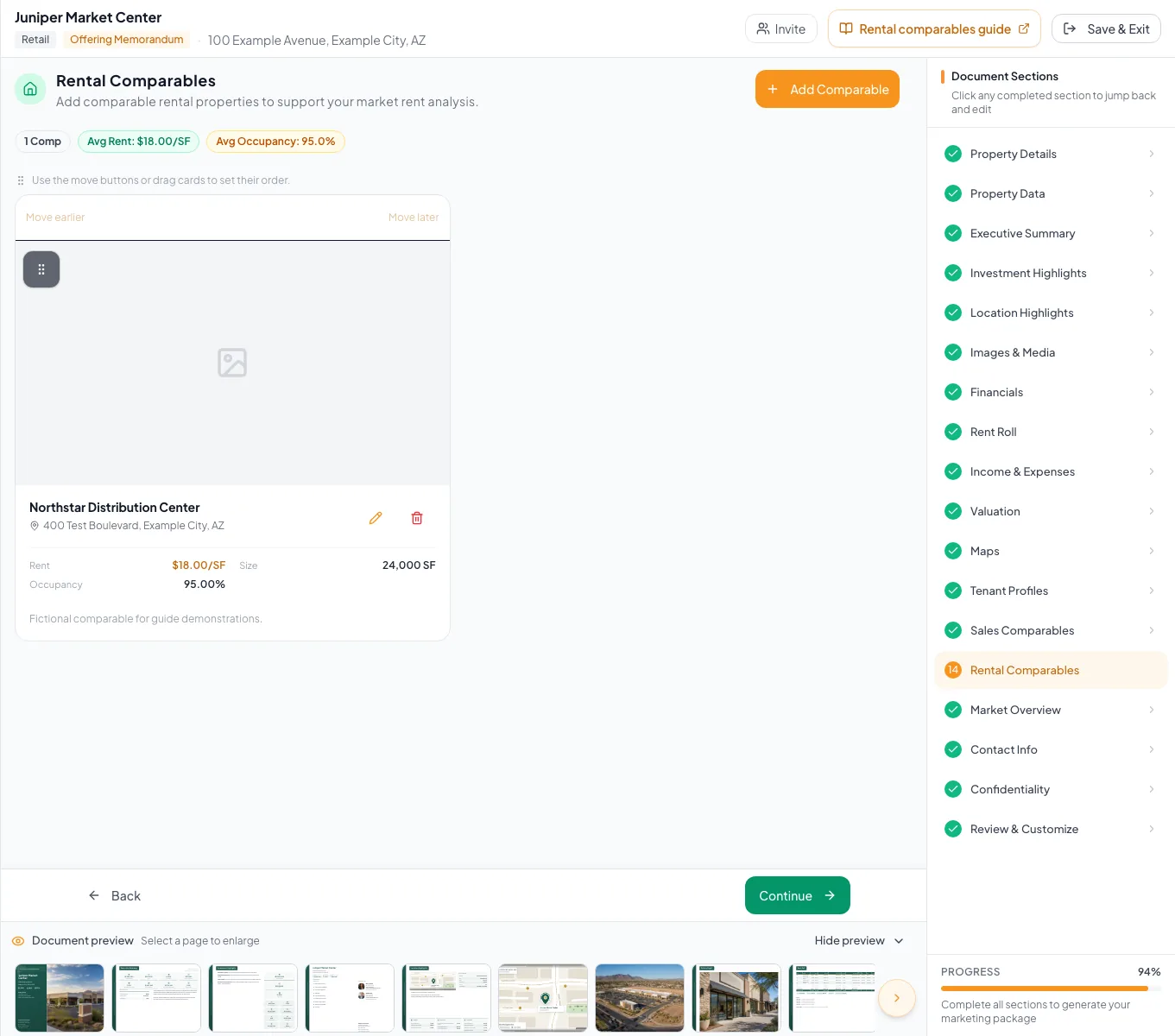
Enter comparable leases using the fields relevant to the property type, then verify units and presentation order. - 2
Add identity and context
Add Comparable form
Enter name, address, year, description, photo, and applicable physical facts.
Expected result: The comparable can be identified and compared with the subject.
If this step does not work
Keep description within 300 characters and use a supported image below 25 MB.
- 3
Enter the market metric
Comparable form
Enter market rent for non-hotel evidence, or ADR and occupancy for Hotel Rate Comps.
Expected result: The relevant summary and calculated values update.
If this step does not work
Confirm currency and percentage conventions if a value appears implausible.
- 4
Save the rental comparable
Comparable form footer
Select Add Comparable for a new record or Save Changes for an existing record.
Expected result: The card appears in the comparable list.
If this step does not work
Do not rely on save as a completeness validation.
- 5
Validate the rental comparable
Comparable card list
Compare all displayed facts with the research source.
Expected result: The card accurately represents the source.
If this step does not work
Edit missing or incorrect fields.
- 6
Order comparables
Comparable card list
Arrange records in the intended final sequence using drag or keyboard controls.
Expected result: The display order updates.
If this step does not work
Use keyboard controls if pointer reordering is inaccessible.
- 7
Review the final page
Review & Customize
Inspect metric labels, summaries, photos, descriptions, and ordering.
Expected result: The evidence supports the subject assumption without mislabeled metrics.
If this step does not work
Return to the comparable form for any correction.
Resolve rental-comparable errors
The step says Hotel Rate Comps
Likely cause: Hospitality intentionally relabels rental comparables.
- Enter ADR and occupancy evidence.
- Verify RevPAR rather than a generic commercial rent metric.
RevPAR is too high or low
Likely cause: Occupancy or ADR uses the wrong units.
- Confirm ADR is a daily currency amount.
- Confirm occupancy is entered as a percentage.
- Multiply independently.
An average is missing
Likely cause: The required denominator or market value is blank.
- Complete the applicable SF, unit, room, and rent facts.
- Use only sourced values.
Rental comps ready
- Correct property-specific step
- Market values sourced
- Physical facts complete
- Hotel RevPAR checked where applicable
- Cards ordered
- Final output reviewed
Related guides
Add and organize sales comparables
Add sales comps and active listings with photos, and CREBuilder calculates price per SF, unit, or key and the average cap rate for you.
Open guideBuild a Hospitality document
Build a hotel OM from room inventory, ADR, and occupancy, with RevPAR, room revenue, hotel rate comps, and Price/Key calculated for you.
Open guideVerify financial pages before publishing
Do a final pass on the financial pages before you send: the right pages, the right labels, and numbers that tie out.
Open guideYour next OM, done this afternoon
Turn your property facts, photos and financials into a polished, branded offering memorandum. Most brokers finish in 30 to 90 minutes.
No credit card required.