Outcome
You can explain every major line in the In-Place and projected years, including why Year 1 differs from In-Place.
Navigation path
Document wizard > Valuation > Cash Flow Projection
Access
Full Financials with Multi-Year Cash Flow
On this page
Before you start
Data, sources, and access to prepare
- A saved rent roll
- Saved income and expense rows
- Saved cash-flow assumptions
Follow the Multi-Year Cash Flow waterfall
Annual cash-flow waterfall
Read each column from base rent down to cash flow after debt.
Base Rental Revenue
Gross potential rent: occupied plus vacant-space rent
Vacancy deductions
Less: Vacancy and Less: Vacancy Factor
Effective Gross Income
Rent after vacancy plus reimbursements and other income
NOI
EGI less operating expenses
Below NOI
Reserves and debt service
Cash Flow After Debt
Remaining projected cash
- Base Rental RevenueVacancy deductions
- Vacancy deductionsEffective Gross Income
- Effective Gross IncomeNOI
- NOIBelow NOI
- Below NOICash Flow After Debt
| Column or row | How CREBuilder calculates it |
|---|---|
| Base Rental Revenue | Occupied plus vacant-space base rent. Hospitality labels it Room Revenue and Mobile Home Parks labels it Gross Pad Income. |
| Less: Vacancy | In-Place deducts all vacant-space rent. Projected years deduct only the share not yet leased under the Lease-Up Scenario. |
| Less: Vacancy Factor | General Vacancy Factor % x base rent after Less: Vacancy, in every column. Reimbursements and other income are not reduced. |
| In-Place | Current annual economics before growth |
| Year 1 | One full year of growth and lease-up after In-Place |
| Cap Rate | NOI divided by the selling price, shown under NOI |
| Cash-on-Cash Return | Cash Flow After Debt divided by selling price less loan amount; shown when financing is on. Closing costs are not included. |
| Exit Price | Exit-year NOI divided by exit cap rate, before selling costs |
Know the calculation order
- Tenant rent grows by its custom escalation schedule first, or its annual growth rate.
- If a tenant, vacancy, or reimbursement growth field is blank, an older document-level rate may apply; most documents have none, so blank usually means 0%. Enter an explicit rate, including 0, on every row you want to control.
- Additional-income and operating-expense rows grow at their own rate, with zero as the default.
- Expenses are grouped into Property Tax, Insurance, Management Fee, and General Expenses based on their names.
- Reserves are the same dollar amount in every column.
- Debt is interest-only for the I/O years, amortizing afterward, and stops after the loan term. In-Place carries the same debt service as Year 1.
- CREBuilder does not calculate IRR or equity multiple.
Lease dates do not prorate the projection
The annual engine does not automatically stop, start, or prorate rent from tenant lease dates. Review whole-year assumptions explicitly.
Reconcile one layer at a time
Cash-flow review steps
- 1
Start with In-Place rent
Valuation, Cash Flow Projection
Compare Base Rental Revenue and reimbursements with the saved rent-roll totals.
Expected result: The first income layer reconciles.
If this step does not work
Return to the first mismatched tenant, vacancy, count, rent basis, or reimbursement.
- 2
Reconcile vacancy and EGI
Cash Flow Projection
Compare Less: Vacancy, Less: Vacancy Factor, reimbursements, other income, and the resulting EGI.
Expected result: The bridge from base rent to EGI is clear.
If this step does not work
Vacancy rows and the vacancy factor stack. Use both only when you want both physical vacancy and a general allowance.
- 3
Reconcile expenses
Cash Flow Projection
Compare expense buckets and total expenses with Income & Expenses.
Expected result: The preview expense total agrees with the saved statement.
If this step does not work
Rename or correct expense rows if a category is grouped unexpectedly.
- 4
Recalculate NOI
Cash Flow Projection
Subtract total operating expenses from EGI.
Expected result: Displayed NOI equals the independently calculated amount.
If this step does not work
Return to the first mismatched income or expense subtotal.
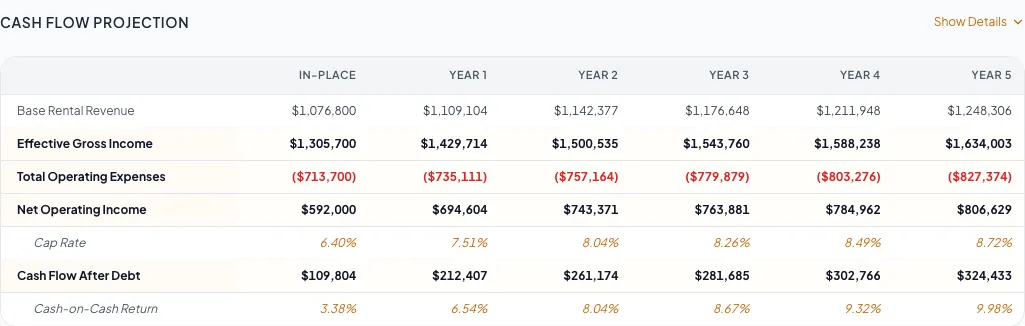
Read the projection from In-Place through later years, including NOI, debt service, cash after debt, and sale proceeds. - 5
Compare Year 1 growth
Cash Flow Projection, Year 1 column
Trace each change to a row growth rate, custom schedule, lease-up, vacancy factor, or expense growth.
Expected result: Every Year 1 change has an input explanation.
If this step does not work
Return to the responsible input rather than editing a calculated total.
- 6
Verify below-NOI items
Cash Flow Projection
Check reserves, debt service, and Cash Flow After Debt against the assumptions.
Expected result: Below-NOI deductions match your loan and reserve inputs.
If this step does not work
Recheck financing term, I/O period, amortization, and reserve dollars.
- 7
Verify exit
Assumptions and preview
Confirm selected exit year, its NOI, and exit cap calculation.
Expected result: Exit price matches the independent calculation.
If this step does not work
Correct the year or cap rate and wait for autosave if it does not match.
Explain unexpected values
Vacancy seems counted twice
Likely cause: Vacancy rows and the General Vacancy Factor % are separate deductions that stack.
- Reconcile physical vacancy rows.
- Review the vacancy factor assumption.
- Use both only when you want both deductions.
A Mixed-Use component row differs from its source total
Likely cause: The preview allocates component gross potential rent using current in-place shares.
- Reconcile the combined total first.
- Then review the component allocation as a presentation breakdown.
IRR or equity multiple is absent
Likely cause: The cash-flow projection reports NOI, cash flow after debt, cash-on-cash, and exit price, not IRR or equity multiple.
- Calculate them in your own model from the annual cash flows and exit price if a buyer needs them.
Year 1 NOI is much higher than In-Place
Likely cause: In-Place deducts all vacant-space rent. Year 1 counts the leased-up share from the Lease-Up Scenario, which defaults to 100% Immediate.
- Open Assumptions.
- Choose a slower Lease-Up Scenario and a Stabilized Year.
- Compare the Less: Vacancy row again.
Projection ready
- In-Place income ties to the rent roll
- Year 1 growth and lease-up are explained
- EGI and NOI tie out
- Reserves and debt match your assumptions
- Exit price matches exit-year NOI and cap rate
Related guides
Set cash-flow assumptions
Set the hold period, vacancy, lease-up, exit cap, loan, and reserves once, and CREBuilder builds the annual cash flow and exit value from them.
Open guideModel rent escalations and reimbursements
Model fixed bumps, step-ups, and expense recoveries per tenant so every projected year matches the lease.
Open guideVerify financial pages before publishing
Do a final pass on the financial pages before you send: the right pages, the right labels, and numbers that tie out.
Open guideYour next OM, done this afternoon
Turn your property facts, photos and financials into a polished, branded offering memorandum. Most brokers finish in 30 to 90 minutes.
No credit card required.