A CRE CRM That Already Knows Your Listings and Deals
CREBuilder's CRM sits inside the platform that creates your listings, offering memorandums, and deal rooms. Every inquiry and NDA signature lands in your CRM with the property attached. Nothing to retype.
No document or credit card required. Email sending requires Pro.
Every relationship. A clear next step.
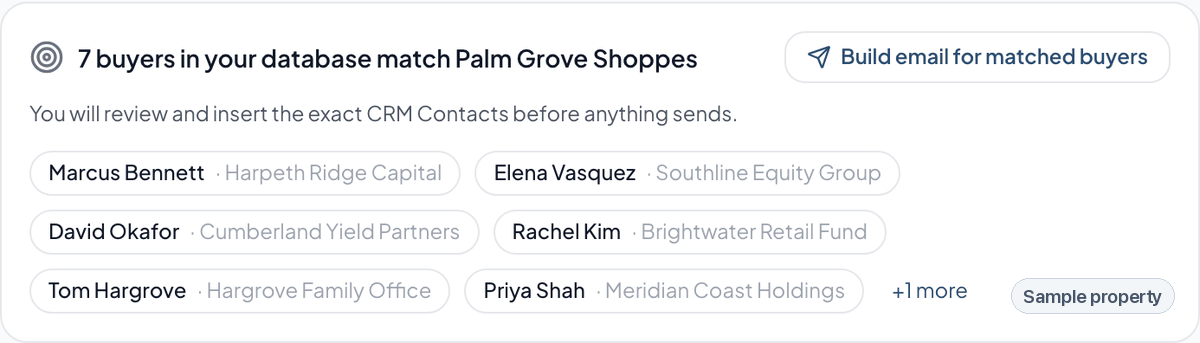
Know which buyers fit the listing
CREBuilder matches the buyers in your CRM to each listing on asset type, market, size, price and cap rate.
What it does
Qualified activity stays connected
Identified listing inquiries, NDA signatures, and gated Deal Room activity can create or update a contact automatically, with the property already attached.
A workbench, not a chart
Open the CRM and see what needs you today: overdue tasks, new leads, deals with no next action, access about to expire. Every number clicks straight through to the records behind it.
Three pipelines, not one
Win the assignment, run the listing, work the buyers — each on its own board with its own stages.
Buyer fit, matched for you
Record a buyer’s buy-box once — size, price, cap rate, market, asset type — and every new listing tells you which of your contacts actually fit it.
Follow-ups that fire themselves
Two days after an NDA is signed, remind me to call — unless I already have. Pick a recipe, adjust the wording, done.
Pipeline you can defend
Weighted value, win rate, stage velocity and days-to-close, built from a real transition history rather than whatever the record says today.
Why brokers stop using the generic CRM
It knows what a listing is
A general-purpose CRM sees a row in a table. This one knows the property, the OM, the deal room, the suites, and who downloaded what.
The seller side has a home
The weeks of pitching before a signed mandate live in an Assignments pipeline — not in your head or a spreadsheet.
Nothing is bolted on
The CRM, the marketing documents, the public listing pages and the deal rooms are one system. An inquiry on a listing page becomes a CRM contact with the property attached.
Questions
- Can I try the CRM without creating a document?
- Yes. Create a free account, then choose Explore CRM. The free CRM includes 100 contacts and 10 active opportunities across your company, plus manual tasks and notes, with no time limit. No document or credit card is required. Email sending, automations, domain connections, advanced reports, and automated matching require Pro.
- Is the CRM included or an add-on?
- The free CRM has contact and active-opportunity limits. Pro removes those CRM limits and includes email sending, automations, domain connections, advanced reports, and automated matching within the CREBuilder plan. Sending also requires Mail approval and setup.
- Do I have to enter leads manually?
- No. Inquiries from your public listing pages, NDA signatures, and deal room activity create and update contacts automatically, with the property and activity already linked. You can also add contacts by hand or import an existing list.
- Can I import contacts from another CRM?
- Yes. Upload a CSV and map its columns. Presets cover HubSpot, Salesforce, Pipedrive, Zoho, Crexi and LoopNet exports, and existing contacts are matched by email so blank fields fill in instead of duplicating.
- Does it work for business brokerage, not just property?
- Yes. Add the Business Sales pipelines during CRM setup or later in Team Settings, then switch between property and business workflows without converting your account or moving existing records. The business ladder includes NDA Sent, NDA Signed and CIM Sent stages. NDA-gated deal rooms, buyer qualification questions and a full signing audit trail work today. Dedicated financial fields — SDE, EBITDA and FF&E — remain on the roadmap.
- Can my whole team use it?
- Yes. Records are owner-scoped by default, and team admins can see the whole company. Saved views are private until you deliberately share them.
- What happens to my data if I leave?
- Contacts and deals can be exported to CSV. Offer history has a separate CSV export. Export anything you need before paid access ends.
Related resources
Related pages
The CRM works alongside secure deal rooms, property email blasts and the documents that generate the leads in the first place.
CRE CRM for brokers
Lead capture from your listing pages, assignment/listing/buyer pipelines, buy-box matching and automated follow-ups.
Read moreProperty email blasts
Send any listing with CREBuilder Mail on our shared domain, optionally verify your own, or download the finished HTML.
Read moreNDA-gated deal rooms
Confidential document sharing behind an NDA. PDF downloads carry the buyer's identity, and access can expire or be revoked.
Read moreOffering memorandum builder
Create investor-ready OMs with property data, financial sections, maps, photos, and branded export.
Read moreCRE template samples
Preview commercial real estate flyer, brochure, OM, leasing, teaser, and BOV template examples.
Read moreCommercial property websites
Publish property listing pages and listing hubs that stay connected to broker marketing materials.
Read moreA CRE CRM that starts with the listing
Inquiries and signed NDAs land as contacts tied to the property, next to the OM and the property website.
Read moreStop retyping your pipeline
Your listings already generate the leads. Let them land somewhere that understands them.