Outcome
Your document shows storage inventory, occupancy, rents, and NOI with Price/Unit and Price/SF.
Navigation path
Create New > Self-Storage > Document wizard
Access
Document creation access
On this page
Before you start
Data, sources, and access to prepare
- Storage unit count by type
- Average rent and occupancy
- Operating statement when Full Financials is used
Use Unit Inventory
| Area | Self-Storage behavior |
|---|---|
| Rent Roll label | Unit Inventory |
| Occupancy | By unit count |
| Price metrics | Price/Unit and Price/SF |
| Rent bases | Monthly or Annual |
| Lease dates | Hidden |
| Reimbursements | Hidden |
| Vacancies | Supported |
Enter category economics
Suggested other income
- Late fees
- Admin fees
- Insurance
- Truck rental
- Retail and supplies
Underwriting notes
- Occupancy in CREBuilder is physical: occupied units divided by total units. If you underwrite economic occupancy, show it through in-place rents and explain it in Property Data.
- Price/SF uses the Building SF saved in Property Data. Enter net rentable SF there when buyers will compare price per NRSF.
- Price/Unit is useful context, but storage usually trades on price per NRSF because unit sizes vary.
Unit Type Required
Storage size or product category.
- Format
- Plain-text storage category label
- Units
- Not applicable
- Save behavior
- Saved when the storage unit or Unit Mix drawer Save action succeeds.
- Downstream effect
- Labels the row in Unit Inventory and the Self-Storage presentation.
Number of Units Required
Count represented by a Unit Mix row.
- Format
- Positive whole number
- Units
- Storage units
- Save behavior
- Saved when the Unit Mix drawer Save action succeeds.
- Downstream effect
- Multiplies per-unit rent and area and contributes to total-unit occupancy and Price/Unit.
Average SF Recommended
Average rentable area for the category.
- Format
- Nonnegative number
- Units
- Square feet per storage unit
- Save behavior
- Saved when the storage unit or Unit Mix drawer Save action succeeds.
- Downstream effect
- Contributes to row area, total rentable area context, and applicable Price/SF output.
Monthly or Annual Rent Recommended
Per-unit current rent.
- Format
- Currency amount plus Monthly or Annual basis
- Units
- Currency per storage unit per month or per year
- Save behavior
- Saved when the storage unit or Unit Mix drawer Save action succeeds.
- Downstream effect
- Annualizes per-unit rent, multiplies grouped rows by count, and feeds storage base rent.
Facility Maintenance Optional
Storage label for the capital expenditure reserve.
- Format
- Nonnegative currency rate
- Units
- Currency per unit per year
- Save behavior
- Autosaves shortly after entry; reopen assumptions to confirm the value stayed.
- Downstream effect
- Deducts rate x total storage units (occupied plus vacant) below NOI.
Cap Improvements Optional
Storage label for the capital-improvements reserve.
- Format
- Nonnegative currency rate
- Units
- Currency per unit per year
- Save behavior
- Autosaves shortly after entry; reopen assumptions to confirm the value stayed.
- Downstream effect
- Deducts rate x total storage units (occupied plus vacant) below NOI.
Marketing/Leasing Optional
Storage label for the marketing and leasing reserve.
- Format
- Nonnegative currency rate
- Units
- Currency per unit per year
- Save behavior
- Autosaves shortly after entry; reopen assumptions to confirm the value stayed.
- Downstream effect
- Deducts rate x total storage units (occupied plus vacant) below NOI.
Unit Type
- Requirement
- Required
- What it means
- Storage size or product category.
- Format
- Plain-text storage category label
- Units
- Not applicable
- Save behavior
- Saved when the storage unit or Unit Mix drawer Save action succeeds.
- Downstream effect
- Labels the row in Unit Inventory and the Self-Storage presentation.
Number of Units
- Requirement
- Required
- What it means
- Count represented by a Unit Mix row.
- Format
- Positive whole number
- Units
- Storage units
- Save behavior
- Saved when the Unit Mix drawer Save action succeeds.
- Downstream effect
- Multiplies per-unit rent and area and contributes to total-unit occupancy and Price/Unit.
Average SF
- Requirement
- Recommended
- What it means
- Average rentable area for the category.
- Format
- Nonnegative number
- Units
- Square feet per storage unit
- Save behavior
- Saved when the storage unit or Unit Mix drawer Save action succeeds.
- Downstream effect
- Contributes to row area, total rentable area context, and applicable Price/SF output.
Monthly or Annual Rent
- Requirement
- Recommended
- What it means
- Per-unit current rent.
- Format
- Currency amount plus Monthly or Annual basis
- Units
- Currency per storage unit per month or per year
- Save behavior
- Saved when the storage unit or Unit Mix drawer Save action succeeds.
- Downstream effect
- Annualizes per-unit rent, multiplies grouped rows by count, and feeds storage base rent.
Facility Maintenance
- Requirement
- Optional
- What it means
- Storage label for the capital expenditure reserve.
- Format
- Nonnegative currency rate
- Units
- Currency per unit per year
- Save behavior
- Autosaves shortly after entry; reopen assumptions to confirm the value stayed.
- Downstream effect
- Deducts rate x total storage units (occupied plus vacant) below NOI.
Cap Improvements
- Requirement
- Optional
- What it means
- Storage label for the capital-improvements reserve.
- Format
- Nonnegative currency rate
- Units
- Currency per unit per year
- Save behavior
- Autosaves shortly after entry; reopen assumptions to confirm the value stayed.
- Downstream effect
- Deducts rate x total storage units (occupied plus vacant) below NOI.
Marketing/Leasing
- Requirement
- Optional
- What it means
- Storage label for the marketing and leasing reserve.
- Format
- Nonnegative currency rate
- Units
- Currency per unit per year
- Save behavior
- Autosaves shortly after entry; reopen assumptions to confirm the value stayed.
- Downstream effect
- Deducts rate x total storage units (occupied plus vacant) below NOI.
Required means the field is needed to complete or support this workflow. Some screens allow a draft to save before every required item is complete. The steps and troubleshooting call out controls the product actively blocks.
Complete the Self-Storage workflow
Self-Storage steps
- 1
Select Self-Storage
Create New, Select Property Type
Choose Self-Storage.
Expected result: Unit Inventory and storage labels activate.
If this step does not work
Change the property type in Property Details if needed.
- 2
Verify total units and price
Property Details
Enter accurate unit count, area, and selling price.
Expected result: Price/Unit and Price/SF have valid denominators.
If this step does not work
Correct property totals before entering grouped inventory.
- 3
Choose the inventory layout
Rent Roll, Unit Inventory > layout selector
Select individual input or Unit Mix.
Expected result: The inventory table matches the source schedule structure.
If this step does not work
Use Unit Mix when the source provides repeated category averages.
- 4
Build Unit Inventory
Rent Roll, Unit Inventory
Enter occupied and vacant categories with count, SF, and per-unit rent.
Expected result: Inventory count and annual rent reconcile.
If this step does not work
Check that grouped rent is per unit, not the category total.
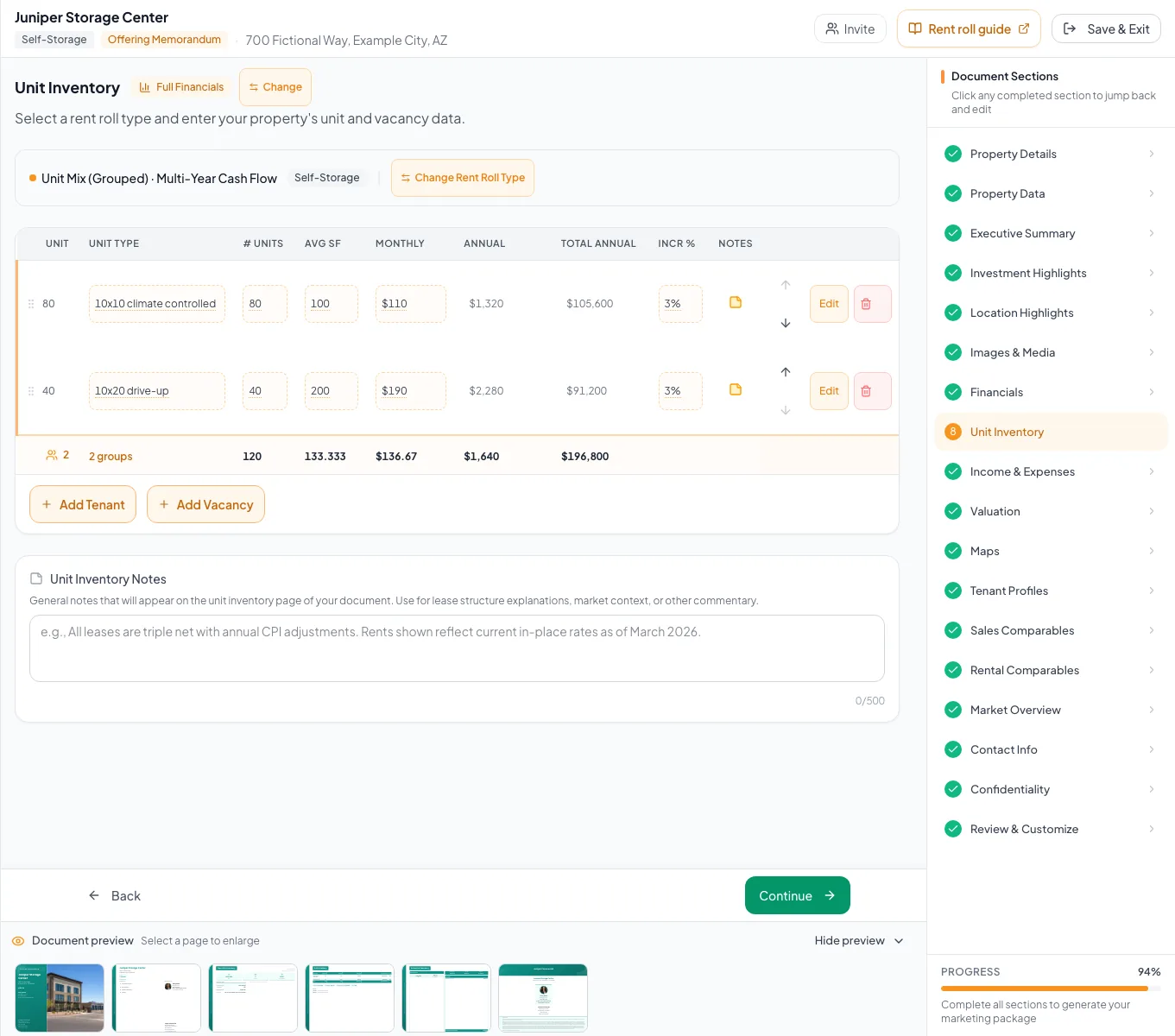
Review the populated self storage example and verify the units, property facts, and applicable model before preparing your own document. - 5
Enter storage income and expenses
Income & Expenses
Add fee, insurance, truck, retail, and operating-expense rows.
Expected result: EGI and NOI reconcile.
If this step does not work
Do not enter generic tenant reimbursements because the storage configuration hides them.
- 6
Verify output
Review & Customize
Check unit count, occupancy, Price/Unit, Price/SF, inventory labels, reserves, and financial pages.
Expected result: The final document uses Self-Storage terminology throughout.
If this step does not work
Return to the source field for the first mismatch.
Resolve Self-Storage issues
Inventory rent is overstated
Likely cause: A total category rent was entered as per-unit rent and multiplied by unit count.
- Enter per-unit rent.
- Confirm category count.
- Recheck annual total.
Lease-date fields are missing
Likely cause: Self-Storage intentionally hides commercial lease dates.
- Use Unit Inventory fields.
- Add material operating context in notes if necessary.
Reserve dollars do not match per-unit math
Likely cause: Reserves equal rate x total storage units, occupied plus vacant. A missing vacancy row, a grouped count, or a different rate changes the total.
- Recalculate rate x total units.
- Check the unit counts in Unit Inventory.
- Correct the rate or the inventory row.
- Unit count matches the facility
- Occupied and vacant inventory reconciled
- Per-unit rent correct
- Other income entered
- Price/Unit and Price/SF checked
- Reserve dollars equal rate x total units
Related guides
Build unit, storage, and pad rent rolls
Enter apartments, storage units, or pads one by one or as a unit mix, and CREBuilder totals rent and occupancy with the right labels for each property type.
Open guideEnter income and operating expenses
Enter other income and operating expenses from your T-12 or budget, and CREBuilder calculates effective gross income and NOI for every page that shows them.
Open guideVerify financial pages before publishing
Do a final pass on the financial pages before you send: the right pages, the right labels, and numbers that tie out.
Open guideYour next OM, done this afternoon
Turn your property facts, photos and financials into a polished, branded offering memorandum. Most brokers finish in 30 to 90 minutes.
No credit card required.