Outcome
Your document shows every pad, Gross Pad Income, park NOI, and Price/Pad in park terminology.
Navigation path
Create New > Mobile Home Parks > Document wizard
Access
Document creation access
On this page
Before you start
Data, sources, and access to prepare
- Pad count and occupancy
- Current lot or pad rent
- Park operating statement when Full Financials is used
Use pad-based analysis
| Area | Mobile Home Park behavior |
|---|---|
| Rent Roll label | Pad Inventory |
| Unit labels | Pads and Total Pads |
| Occupancy | By pad count |
| Primary metric | Price/Pad |
| Income label | Gross Pad Income |
| Rent bases | Monthly or Annual |
| Lease dates and reimbursements | Hidden |
Enter pad and park economics
Suggested other income
- Laundry
- Storage
- RV parking
- Utility reimbursements
- Late fees
Underwriting notes
- Pad Inventory models lot rent. Enter rent from park-owned homes (POH) as a separate Additional Income row so buyers can see lot rent and home rent apart.
- Enter water, sewer, or trash bill-backs as Utility reimbursements in Additional Income, and the matching utility costs as operating expenses.
Pad Type Required
Category or identifying label for pads.
- Format
- Plain-text pad category or identifier
- Units
- Not applicable
- Save behavior
- Saved when the pad or grouped-row drawer Save action succeeds.
- Downstream effect
- Labels the row in Pad Inventory and the Mobile Home Park presentation.
Number of Pads Required
Count represented by a grouped row.
- Format
- Positive whole number
- Units
- Pads
- Save behavior
- Saved when the grouped-row drawer Save action succeeds.
- Downstream effect
- Multiplies per-pad rent and contributes to Total Pads, occupancy, Gross Pad Income, and Price/Pad.
Average SF Optional
Average area where meaningful to the source.
- Format
- Nonnegative number
- Units
- Square feet per pad
- Save behavior
- Saved when the pad or grouped-row drawer Save action succeeds.
- Downstream effect
- Adds pad-size context to inventory output where the source provides it.
Monthly or Annual Rent Recommended
Per-pad current rent.
- Format
- Currency amount plus Monthly or Annual basis
- Units
- Currency per pad per month or per year
- Save behavior
- Saved when the pad or grouped-row drawer Save action succeeds.
- Downstream effect
- Annualizes per-pad rent, multiplies grouped rows by count, and feeds Gross Pad Income.
Lot Improvements Optional
Park label for the capital expenditure reserve.
- Format
- Nonnegative currency rate
- Units
- Currency per pad per year
- Save behavior
- Autosaves shortly after entry; reopen assumptions to confirm the value stayed.
- Downstream effect
- Deducts rate x total pads (occupied plus vacant) below NOI.
Cap Improvements Optional
Park label for the capital-improvements reserve.
- Format
- Nonnegative currency rate
- Units
- Currency per pad per year
- Save behavior
- Autosaves shortly after entry; reopen assumptions to confirm the value stayed.
- Downstream effect
- Deducts rate x total pads (occupied plus vacant) below NOI.
Marketing/Leasing Optional
Park label for the marketing and leasing reserve.
- Format
- Nonnegative currency rate
- Units
- Currency per pad per year
- Save behavior
- Autosaves shortly after entry; reopen assumptions to confirm the value stayed.
- Downstream effect
- Deducts rate x total pads (occupied plus vacant) below NOI.
Pad Type
- Requirement
- Required
- What it means
- Category or identifying label for pads.
- Format
- Plain-text pad category or identifier
- Units
- Not applicable
- Save behavior
- Saved when the pad or grouped-row drawer Save action succeeds.
- Downstream effect
- Labels the row in Pad Inventory and the Mobile Home Park presentation.
Number of Pads
- Requirement
- Required
- What it means
- Count represented by a grouped row.
- Format
- Positive whole number
- Units
- Pads
- Save behavior
- Saved when the grouped-row drawer Save action succeeds.
- Downstream effect
- Multiplies per-pad rent and contributes to Total Pads, occupancy, Gross Pad Income, and Price/Pad.
Average SF
- Requirement
- Optional
- What it means
- Average area where meaningful to the source.
- Format
- Nonnegative number
- Units
- Square feet per pad
- Save behavior
- Saved when the pad or grouped-row drawer Save action succeeds.
- Downstream effect
- Adds pad-size context to inventory output where the source provides it.
Monthly or Annual Rent
- Requirement
- Recommended
- What it means
- Per-pad current rent.
- Format
- Currency amount plus Monthly or Annual basis
- Units
- Currency per pad per month or per year
- Save behavior
- Saved when the pad or grouped-row drawer Save action succeeds.
- Downstream effect
- Annualizes per-pad rent, multiplies grouped rows by count, and feeds Gross Pad Income.
Lot Improvements
- Requirement
- Optional
- What it means
- Park label for the capital expenditure reserve.
- Format
- Nonnegative currency rate
- Units
- Currency per pad per year
- Save behavior
- Autosaves shortly after entry; reopen assumptions to confirm the value stayed.
- Downstream effect
- Deducts rate x total pads (occupied plus vacant) below NOI.
Cap Improvements
- Requirement
- Optional
- What it means
- Park label for the capital-improvements reserve.
- Format
- Nonnegative currency rate
- Units
- Currency per pad per year
- Save behavior
- Autosaves shortly after entry; reopen assumptions to confirm the value stayed.
- Downstream effect
- Deducts rate x total pads (occupied plus vacant) below NOI.
Marketing/Leasing
- Requirement
- Optional
- What it means
- Park label for the marketing and leasing reserve.
- Format
- Nonnegative currency rate
- Units
- Currency per pad per year
- Save behavior
- Autosaves shortly after entry; reopen assumptions to confirm the value stayed.
- Downstream effect
- Deducts rate x total pads (occupied plus vacant) below NOI.
Required means the field is needed to complete or support this workflow. Some screens allow a draft to save before every required item is complete. The steps and troubleshooting call out controls the product actively blocks.
Complete the Mobile Home Park workflow
Mobile Home Park steps
- 1
Select Mobile Home Parks
Create New, Select Property Type
Choose Mobile Home Parks.
Expected result: Pad Inventory and Price/Pad labels activate.
If this step does not work
Change the property type in Property Details if needed.
- 2
Verify total pads and price
Property Details
Enter accurate total pads and selling price.
Expected result: Price/Pad uses the correct denominator.
If this step does not work
Correct total pads before entering grouped inventory.
- 3
Build Pad Inventory
Rent Roll, Pad Inventory
Enter occupied and vacant pads or categories with counts and monthly or annual per-pad rent.
Expected result: Pad count and Gross Pad Income reconcile.
If this step does not work
Check count and per-pad basis if totals are wrong.
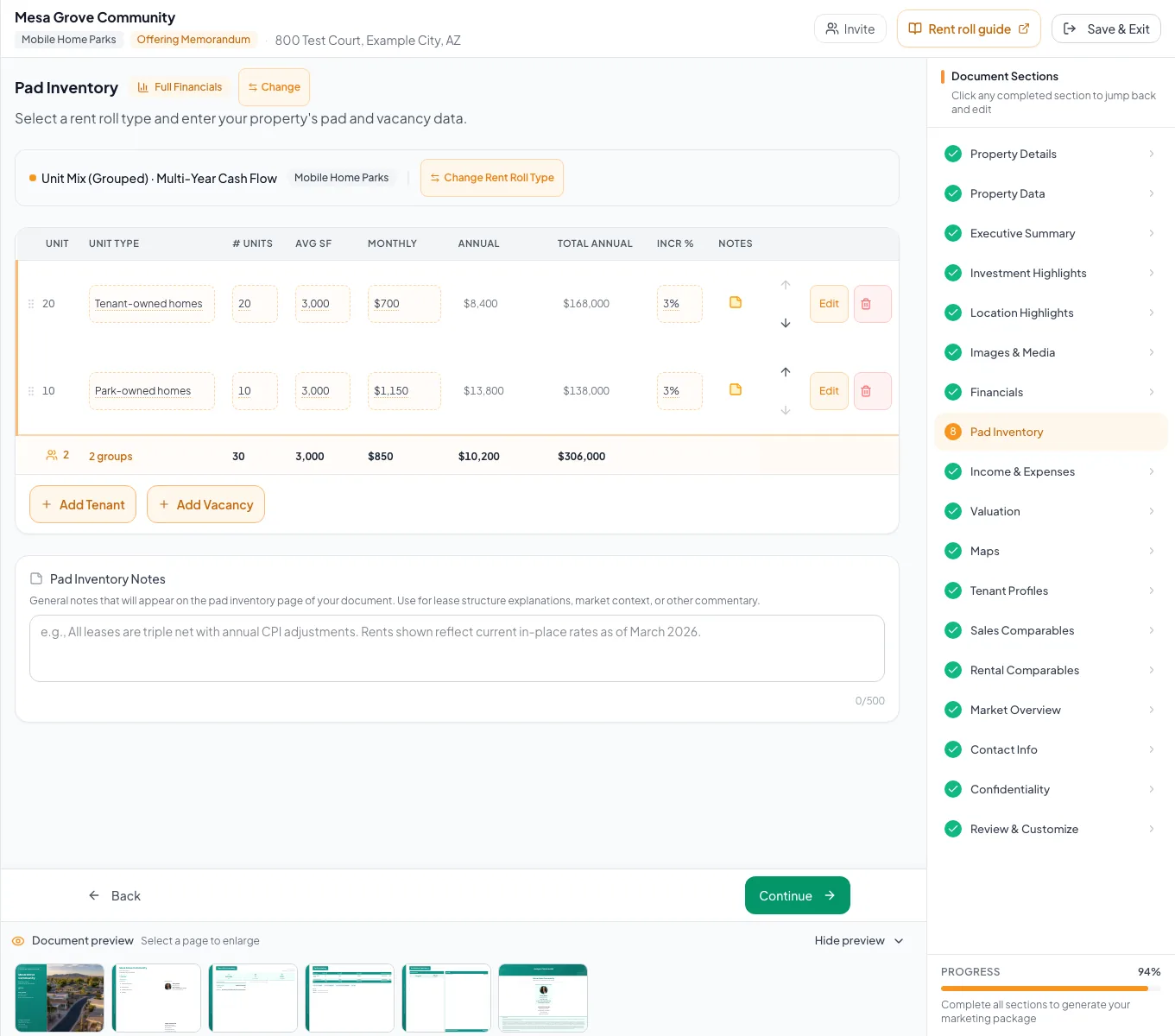
Review the populated mobile home parks example and verify the units, property facts, and applicable model before preparing your own document. - 4
Enter other income and expenses
Income & Expenses
Add laundry, storage, RV parking, utility reimbursement, POH rent, late-fee, and expense rows.
Expected result: Park EGI and NOI match your statement.
If this step does not work
Tenant reimbursements are hidden for parks, so enter bill-backs as Additional Income.
- 5
Review output
Review & Customize
Verify Total Pads, occupancy, Price/Pad, Gross Pad Income, inventory, reserves, and pages.
Expected result: The final document uses park terminology throughout.
If this step does not work
Return to the first source input with a mismatch.
Resolve Mobile Home Park issues
Gross Pad Income is overstated
Likely cause: Grouped rent may already include all pads but is multiplied by the count.
- Enter per-pad rent.
- Confirm the count.
- Recheck annual income.
Occupancy differs from site area
Likely cause: Park occupancy is based on occupied pads, not square footage.
- Reconcile occupied and total pads.
- Treat area as separate context.
Reserve dollars do not match per-pad math
Likely cause: Reserves equal rate x total pads, occupied plus vacant. A missing vacancy row or a different rate changes the total.
- Recalculate rate x total pads.
- Check the pad counts in Pad Inventory.
- Correct the rate or the inventory row.
- Total pads match the park
- Pad inventory reconciled
- Per-pad rent correct
- Gross Pad Income checked
- Price/Pad checked
- Reserve dollars reviewed
Related guides
Build unit, storage, and pad rent rolls
Enter apartments, storage units, or pads one by one or as a unit mix, and CREBuilder totals rent and occupancy with the right labels for each property type.
Open guideEnter income and operating expenses
Enter other income and operating expenses from your T-12 or budget, and CREBuilder calculates effective gross income and NOI for every page that shows them.
Open guideVerify financial pages before publishing
Do a final pass on the financial pages before you send: the right pages, the right labels, and numbers that tie out.
Open guideYour next OM, done this afternoon
Turn your property facts, photos and financials into a polished, branded offering memorandum. Most brokers finish in 30 to 90 minutes.
No credit card required.