Outcome
You know your open pipeline, weighted forecast, GCI, win rate, and best lead sources, and can explain every number to your team.
Navigation path
CRM > Reports
Access
A paid CREBuilder plan is required. Company role and record scope still apply.
On this page
Before you start
Data, sources, and access to prepare
- Enough permitted CRM data for the period being reviewed
- Reviewed Deal stages, values, close dates, commission, and splits
Separate active business from deal performance
The active-business snapshot shows active Deals and representation opportunities, including seller work before a listing exists. Property/deal value is grouped by pipeline; expected commission is a separate estimate. Missing estimates are shown explicitly. A seller opportunity and its linked listing count once, and winning representation does not count as earned revenue.
Current snapshot versus historical results
The active-business snapshot is current and does not use the date range for Deal performance below it. Existing GCI, forecast, source, funnel, and activity reports retain their calculation and scope rules described in this article.
Set the date range and pipeline
- 1
Open Reports
CRM > Reports
Wait for every report section to finish loading.
Expected result: The KPI cards and report sections display for your permitted scope.
If this step does not work
If any warning or Retry control appears, retry before presenting the page as complete.
- 2
Choose the date range
Reports > range selector
Select All time, 30d, 90d, or 1yr.
Expected result: Date-sensitive report components reload for the selected range.
If this step does not work
Some sections are current snapshots that ignore the range; see the table below.
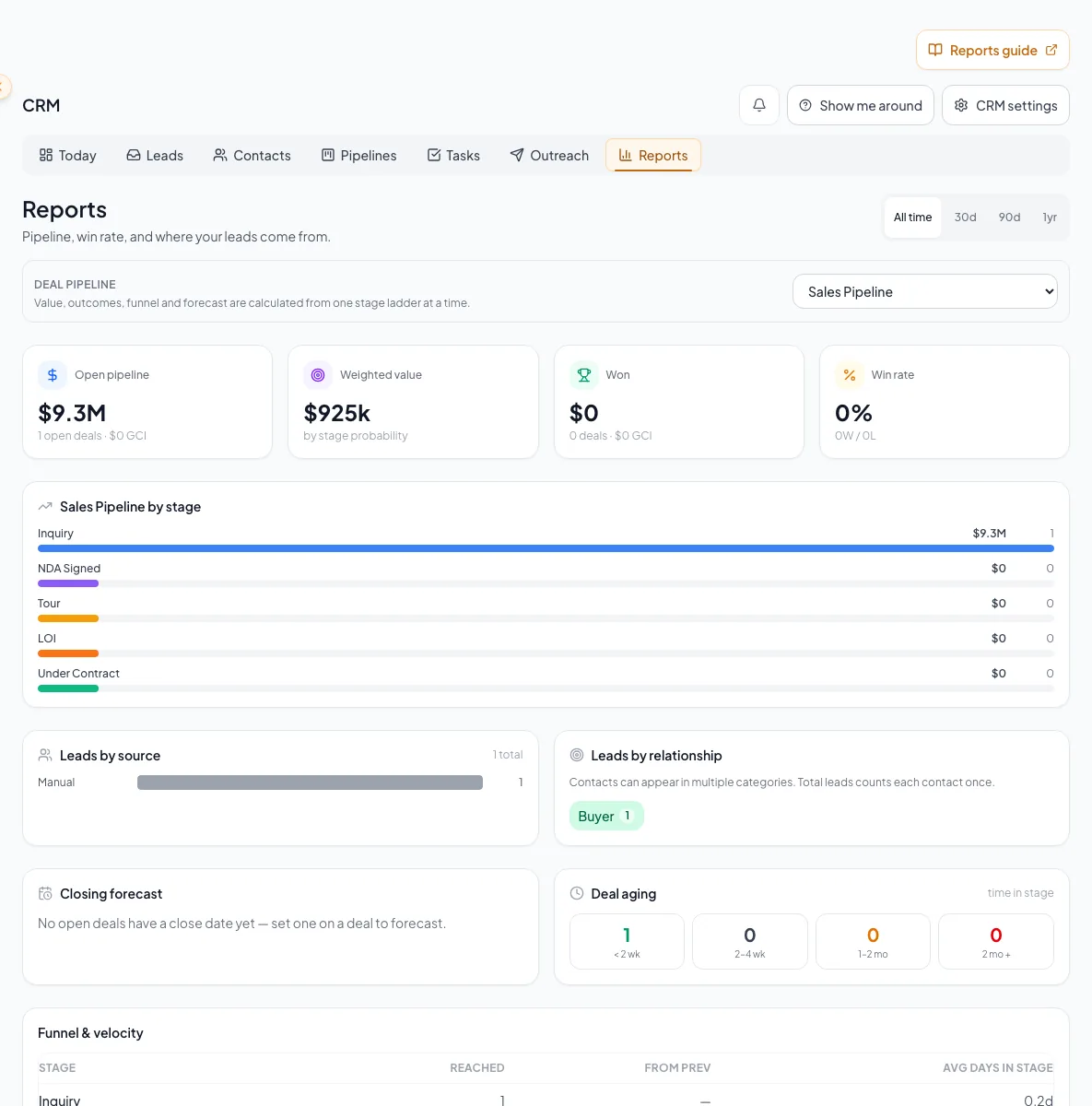
Read each report using its documented formula, date rule, ownership scope, limitation, and true or filtered empty state. - 3
Choose the Deal pipeline
Reports > Deal pipeline selector
When more than one Deal pipeline exists, select the intended pipeline.
Expected result: Deal-based report sections reflect that pipeline.
If this step does not work
If the selector is absent, your company has one Deal pipeline.
- 4
Record context before sharing
Your review notes
Record the report context: range, selected Deal pipeline, current role scope, plus date of review.
Expected result: Another reader can understand the report context.
If this step does not work
To work individual records, open Deals, Leads, Contacts, or Tasks with their own filters.
Know which numbers follow the date range
| Report component | How the selected range applies |
|---|---|
| Open pipeline, pipeline by stage, closing forecast, aging | Current snapshot. These do not become historical snapshots when the range changes. |
| Funnel and velocity | Current/all-time stage-state interpretation and current stage age, not historical transition timing. |
| Won and Lost | Uses when the Deal was actually marked Won or Lost inside the selected range, not its expected close date. |
| New leads by source or type | Uses the first qualifying lead-fact date inside the range. |
| Activity | Uses the activity date inside the range. |
| Source Outcomes | Deal count includes all deals; Won and GCI honor the selected range. |
Say which basis each number uses
One date range sits above sections that count time differently. When you share a number, say whether it is a current snapshot or a result for the selected range.
Interpret KPIs, forecast, funnel, and agent production
| Metric or section | Definition and caveat |
|---|---|
| Open pipeline and GCI | Current open Deal value and commission. A fixed commission takes precedence over Deal value multiplied by commission percentage. |
| Weighted pipeline | Open value multiplied by current stage probability. |
| Won and GCI | Deals marked Won in the selected range and their calculated GCI. The recorded outcome time controls the range. |
| Win rate | Won divided by Won plus Lost for ranged closes; displays 0 when there are no closes. |
| Closing forecast | Open Deals with a close date, grouped by month with gross, weighted, and GCI totals. |
| Aging | Current open Deals grouped by time in their current stage: under 14, 14 to 29, 30 to 59, and 60+ days. |
| Funnel | Infers reached stages from current stage sort. Lost Deals lack complete stage history, so the funnel is approximate. |
| Velocity | Average age of Deals currently in a stage, not actual transition duration. |
| By Agent | Available to company-wide CRM roles and shown only when the report contains more than one agent row. Internal agent splits receive GCI; no splits assigns 100 percent to owner; non-agent rows reduce owner residual. |
| Source to revenue | Connects first/source attribution with Deal outcomes, subject to mixed range behavior above. |
Report inputs must be maintained upstream
Reports aggregate CRM facts. They do not repair incomplete source records.
Lead facts and activity
Deal stage, value, close, commission, splits
Report aggregates
Human operating interpretation
- Lead facts and activityReport aggregates
- Deal stage, value, close, commission, splitsReport aggregates
- Report aggregatesHuman operating interpretation
Run your weekly pipeline review
Before presenting
- All sections loaded without a warning.
- Range, Deal pipeline, role scope, and date are recorded.
- Snapshot panels are not described as historical range snapshots.
- Funnel is labeled approximate.
- Velocity is labeled current-stage age.
- Flat GCI values and internal splits were spot-checked.
Changing the range does not change a panel
Likely cause: The panel may be a current snapshot or all-time stage interpretation.
- Check the date-range table above.
- Confirm whether the panel uses the recorded Won/Lost time, expected close date, lead-fact date, activity date, or current state.
- Do not assume a cache problem solely from an unchanged number.
You want to filter by owner, stage, or source
Likely cause: Reports filters by date range and Deal pipeline.
- Use the range and Deal pipeline controls.
- Open Deals, Leads, Contacts, or Tasks to filter individual records.
There is no drill-through or export
Likely cause: Reports shows totals and charts; the records behind them live in their own lists.
- Open Deals, Leads, Contacts, or Tasks to see the records behind a number.
- Note the range and pipeline when you share a screenshot.
By Agent is absent
Likely cause: By agent requires company-wide CRM access and more than one agent row in the report.
- Confirm your role and the report filters.
- A report with zero or one agent row does not show this section, even for an Admin.
A CRM that already knows your listings
Track buyers, tenants and deals right next to the OMs, listings and Deal Rooms you build in CREBuilder. Free to start.
No credit card required.