Outcome
Your send list is clean: valid, de-duplicated, up to 500 recipients, and free of anyone who unsubscribed, bounced, or complained, and the audience sending check shows how many sends it can use now.
Navigation path
Email Blasts > Composer > Audience
Access
Included with any paid CREBuilder plan. Saved drafts and send history stay listed if a subscription lapses.
On this page
Before you start
Data, sources, and access to prepare
- A hosted Mail campaign draft
- First-party relationship and appropriate permission for every audience source
- No purchased, rented, scraped, or uncertain lists
Choose from four audience inputs
Typed addresses
- How it works
- Paste or type addresses separated by commas, spaces, or line breaks
- Important boundary
- Strict validation and case-insensitive deduplication apply.
CRM picker
- How it works
- Filter permitted contacts by tag, pipeline stage using the Any pipeline stage filter, interested property type, or Fits this listing
- Important boundary
- Review the full returned list, search it, select the intended contacts, and confirm Insert N selected.
Matched audience handoff
- How it works
- Uses active requirements to find relevant people for one property
- Important boundary
- Fit is available only for a single-property campaign and is not consent.
Imported file
- How it works
- Scans arbitrary CSV, TXT, or TSV text up to 5 MB for email-shaped tokens
- Important boundary
- No header or column mapping is required. The file is not saved with the draft.
The CRM importer and audience importer are different
CRM contact CSV import requires headers and mapping. Email Blast recipient files are scanned as arbitrary text and do not require a header.
Add and inspect each source
- 1
Open the Audience step
Composer > step bar > Audience
Select Audience, or Next: audience from the Content step.
Expected result: The Choose your audience section shows the sending status card, the Recipients field, Add from CRM Contacts, and Import from a file (CSV).
If this step does not work
If the section shows Download / other apps, select Use CREBuilder Mail to return to hosted sending.
- 2
Enter typed addresses
Audience step > Recipients text area
Enter addresses with supported separators.
Expected result: Valid addresses normalize into the unique audience.
If this step does not work
Correct a token immediately if the composer cannot parse it.
- 3
Review typed-address feedback
Audience step > Recipients feedback
Inspect the feedback for invalid or duplicate entries.
Expected result: The first three invalid tokens are named, with a count of any others. Duplicates are excluded from the unique count.
If this step does not work
Fix or remove every invalid token. Do not proceed while client or server validation reports one.
- 4
Build a CRM selection
Audience step > Add from CRM Contacts
Filter by tag, pipeline stage using the Any pipeline stage filter, interested property types, or Fits this listing for a single property.
Expected result: The picker shows the full returned, suppression-aware audience with search, individual checkboxes, Select all, Clear, and a selected count.
If this step does not work
If empty or failed, clear filters one at a time, confirm role scope, retry the request, and verify active requirements.
- 5
Search the returned CRM audience
Recipient picker > Search this recipient audience
Search for a contact in the returned list.
Expected result: Matching rows are easier to inspect; the selected count still represents the full selection.
If this step does not work
Clear the search to review contacts outside the visible matches. Searching does not change the selection.
- 6
Select the intended CRM contacts
Recipient picker > contact checkboxes
Select or clear individual contacts, using Clear or Select all when appropriate.
Expected result: The selected count reflects exactly the contacts you intend to insert.
If this step does not work
Review the full list before insertion. A property match does not establish permission to email.
- 7
Review the CRM selection
Recipient picker > selection summary
Compare the selected count with the intended audience.
Expected result: Insert N selected agrees with the reviewed contacts.
If this step does not work
Adjust the selection if the count is unexpected.
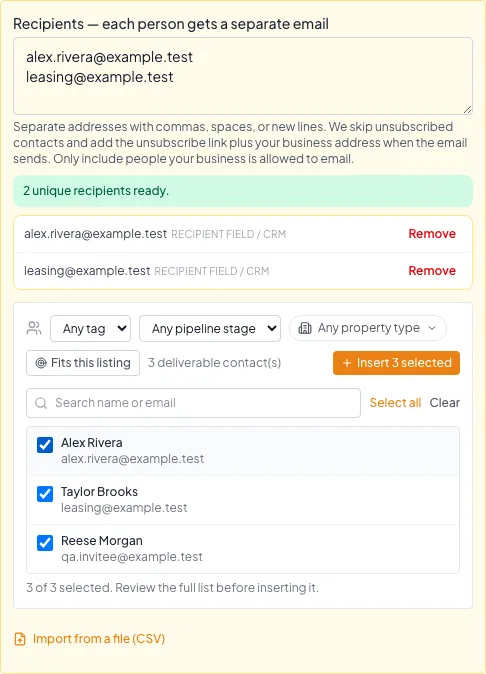
Review the full returned CRM audience, select the intended contacts, and verify the count before inserting. Addresses already in this draft are deduplicated. - 8
Insert the CRM selection
Recipient picker > Insert N selected
Select Insert N selected explicitly.
Expected result: The selected addresses join the composer audience without sending.
If this step does not work
Closing the picker does not insert anything. Reopen it and select Insert intentionally.
- 9
Choose an address file
Audience step > Import from a file (CSV)
Select a CSV, TXT, or TSV file up to 5 MB.
Expected result: The composer reads addresses from the chosen file.
If this step does not work
If the file is larger than 5 MB, export a smaller first-party list.
- 10
Review the imported file
Audience step > imported file chip
Inspect the file summary, including its name and extracted or duplicate totals.
Expected result: The chip shows retained unique addresses and any duplicate tokens removed.
If this step does not work
If no addresses are found, inspect the source text before choosing another file.
- 11
Re-import after a reload
Audience step > Import from a file (CSV)
Select the original file again after returning to a saved draft.
Expected result: The file audience is restored for the current session with provenance intact.
If this step does not work
The file is intentionally not stored with the draft. Never assume its prior recipients remain attached.
- 12
Verify the restored file audience
Audience step > imported file chip
Inspect the retained unique-address count.
Expected result: The restored count agrees with the reviewed source file.
If this step does not work
Remove the imported file and choose the source again if the count differs.
Understand provenance, review, and consent
Audience classification is conservative
CREBuilder classifies the final list. One uploaded or unverified source makes the whole list Uploaded for review and allowance.
Typed, CRM, match, or file inputs
All contacts have trusted captured CRM sources
Any file, manual/import/unknown, non-CRM, or mixed source
CRM audience classification
Uploaded classification
Always reviewed and half allowance
- Typed, CRM, match, or file inputsAll contacts have trusted captured CRM sourcesall trusted
- Typed, CRM, match, or file inputsAny file, manual/import/unknown, non-CRM, or mixed sourceany untrusted
- All contacts have trusted captured CRM sourcesCRM audience classification
- Any file, manual/import/unknown, non-CRM, or mixed sourceUploaded classification
| Question | Correct rule |
|---|---|
| Does a CRM record prove consent? | No. Confirm the first-party relationship and permission for the intended message. |
| Does a property match prove consent? | No. Matching establishes relevance only. |
| Can an imported CRM contact be a trusted campaign source automatically? | No. Manual, import, unknown, mixed, and non-CRM provenance is treated conservatively. |
| Can purchased or rented lists be used? | No. |
| What happens to an uploaded-classified audience? | It is held for human review and uses half the displayed allowance. |
Apply the final cap and suppression funnel
As soon as the audience has at least one recipient, the Audience sending check below the list asks the server to evaluate it. The check reports recipients ready, suppressed and duplicate counts, whether the audience is a CRM audience or an imported or unconfirmed audience, the recipient sends available now for this audience, when the daily allowance resets, and whether the campaign needs review. It refreshes when recipients, the subject, properties, or the schedule change, and CREBuilder runs the same check again when you send.
From raw inputs to final deliverable audience
CREBuilder checks the list again when you send.
All entered addresses
Strict valid addresses
Case-insensitive unique addresses
500 or fewer
Remove unsubscribe, hard bounce, and complaint
Reviewed final audience
- All entered addressesStrict valid addresses
- Strict valid addressesCase-insensitive unique addresses
- Case-insensitive unique addresses500 or fewer
- 500 or fewerRemove unsubscribe, hard bounce, and complaint
- Remove unsubscribe, hard bounce, and complaintReviewed final audience
- 1
Review the unique total
Audience step > Recipients summary
Confirm deduplication across typed, file, CRM, and matched sources leaves no more than 500 unique addresses.
Expected result: The count is within the direct-send cap.
If this step does not work
Remove lower-priority segments, or use Download HTML for a larger list.
- 2
Read the audience sending check
Audience step > Audience sending check
Read the server result below the recipient list.
Expected result: It shows recipients ready, suppressed and duplicate counts, the CRM or imported classification, the recipient sends available now, the reset time, and whether review is required.
If this step does not work
If it says the audience could not be checked, select Check audience again. Nothing sends until the check succeeds.
- 3
Review source classification
Audience sending check
Inspect the effective CRM or imported classification plus its review and allowance effect.
Expected result: The expected review path and quota cost are understood before submission.
If this step does not work
If the classification is imported or unconfirmed unexpectedly, inspect for a file, manual, import, or unknown contact, a non-CRM address, or a mixed source.
- 4
Confirm the final suppression result
Review & send > Confirm hosted email send
Read the recipients after exclusions in the confirmation.
Expected result: The server has removed protected addresses and reports the remaining count or a refusal.
If this step does not work
Do not re-add a suppressed address through another input. If every address is protected, the send is refused.
Resolve validation and audience failures
A file reports no email addresses
Likely cause: The arbitrary-text scan did not find email-shaped tokens.
- Open the source as text.
- Confirm complete addresses are present.
- Export CSV, TXT, or TSV up to 5 MB.
- No header is required.
The audience exceeds 500
Likely cause: CREBuilder Mail sends to up to 500 unique recipients per campaign.
- Narrow CRM filters or remove contacts this message is not for.
- For a larger list, choose Download HTML and send the design from your own email platform. The 500 limit applies only to CREBuilder Mail.
- Do not split one campaign into several CREBuilder Mail sends to get around the limit, review, or quota.
The audience sending check says fewer sends are available than you expected
Likely cause: The check uses the company allowance across all senders, the imported-list sub-allowance when a file is present, and any ramp or throttle in effect.
- Read the available count and reset time on the check.
- Reduce the audience or wait for the reset.
- Other company sends can change the available allowance before you confirm, so read the confirmation too.
A contact is suppressed
Likely cause: The address unsubscribed, hard-bounced, complained, or carries protected provider opt-out evidence.
- Do not override or re-import the address.
- Correct a truly erroneous suppression only through the authorized support process.
- Use an appropriate alternative contact channel when lawful.
Every recipient was removed
Likely cause: All effective addresses are suppressed or invalid.
- Stop the send.
- Review how the audience was sourced.
- Do not replace protected addresses with aliases.
- Build a new permitted audience only from valid first-party consent.
Audience check
- Every source is first-party and permitted.
- No purchased, rented, or scraped list is present.
- No invalid token remains.
- Duplicates were reviewed.
- Unique total is 500 or fewer.
- CRM selection was explicitly inserted.
- File count and provenance were reviewed.
- The audience sending check succeeded and its available count covers the audience.
- Imported-audience review and half allowance are understood.
- Suppressed addresses were not re-added.
Your next OM, done this afternoon
Turn your property facts, photos and financials into a polished, branded offering memorandum. Most brokers finish in 30 to 90 minutes.
No credit card required.