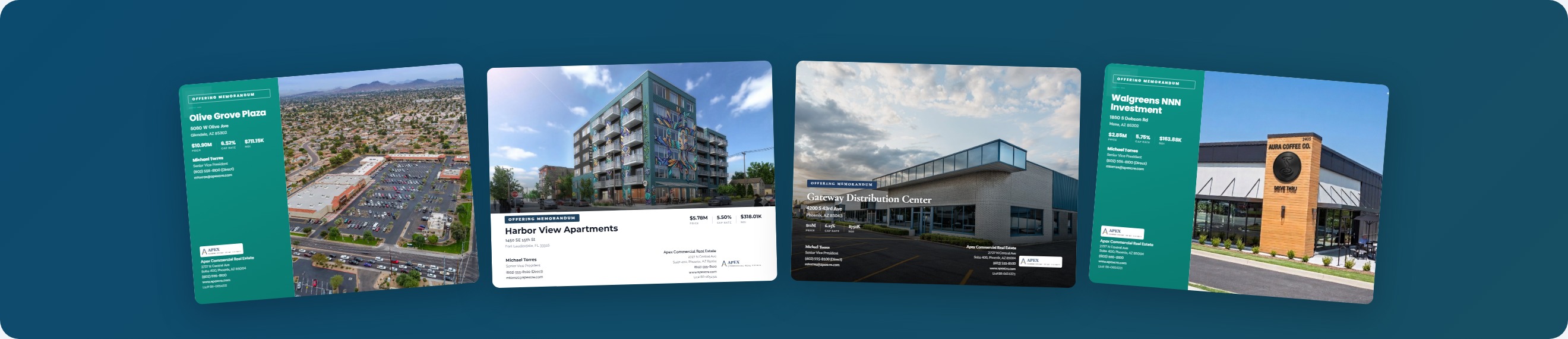
If you're a commercial real estate broker shopping for marketing software, you've probably come across both Buildout and CREBuilder. Both platforms help brokers create offering memorandums, sales teasers, and other marketing materials — but they take very different approaches to pricing, features, and usability.
This comparison breaks down the key differences so you can make an informed decision for your brokerage.
Pricing: The Biggest Differentiator
Buildout prices per user on annual contracts, with plans typically starting around $300-500/month per user. Enterprise pricing goes higher with added features. Most plans require annual commitments with no month-to-month option.
CREBuilder offers straightforward pricing starting at $69/month (annual) or $89/month (monthly) per user. No annual contract required — you can cancel anytime. There's also a free tier that lets you explore the platform before committing.
For a solo broker, that's a potential savings of $2,500-5,000+ per year. For a team of five, the math gets even more compelling.
View current CREBuilder pricing
Document Types
Both platforms cover the core CRE marketing documents:
| Document Type | Buildout | CREBuilder |
|---|---|---|
| Offering Memorandums | Yes | Yes |
| Sales Teasers | Yes | Yes |
| Leasing Packages | Yes | Yes |
| For Sale Flyers | Yes | Yes |
| For Lease Flyers | Yes | Yes |
| BOV / Property Valuations | Limited | Yes |
| Property Websites | Yes (add-on) | Included |
CREBuilder includes property websites and BOV reports in the base plan. With Buildout, property websites and some features may require higher-tier plans or add-ons.
Financial Capabilities
This is where CREBuilder particularly stands out. The platform includes a full financial calculator with:
- Multiple rent roll modes: Standard, industrial, hospitality, self-storage, mobile home parks, and net lease — each with property-type-specific fields
- Automated cash flow projections with growth rate assumptions
- Cap rate and NOI calculations that update in real-time
- Vacancy and expense modeling
- Mixed-use component breakdowns
Rather than entering financials into a separate spreadsheet and importing them, CREBuilder's financial engine is built into the document creation flow. Change a tenant's rent, and every financial metric across the entire document updates automatically.
Property Type Coverage
CREBuilder supports 12 distinct property types, each with tailored data fields and document sections:
Retail, Office/Medical, Multifamily, Industrial, Land, Hospitality, Self-Storage, Mobile Home Parks, Mixed-Use, Net Lease, and more. Each property type has specialized sections — like unit mix for multifamily, ADR/RevPAR for hospitality, or pad inventory for mobile home parks.
Buildout covers the major property types but may require more manual customization for specialized asset classes.
Map Builder
CREBuilder includes a built-in aerial map builder that lets you create professional location maps with:
- Satellite or street view base maps
- Logo overlays for nearby tenants and amenities
- Custom markers and labels
- Multiple zoom levels
These maps are automatically included in your OMs, teasers, and flyers. No need to screenshot Google Maps or use separate design software.
Template Design
Both platforms offer professionally designed templates. CREBuilder provides five distinct theme families — each with its own typography, color palette, and layout philosophy. You can customize primary and secondary colors to match your brokerage branding.
Templates apply across all document types, so your OMs, teasers, and flyers share a consistent brand identity.
Ease of Use
CREBuilder uses a guided wizard workflow: select your property type, choose your package (OM, teaser, etc.), pick a template, and start editing. The step-by-step approach means you don't need to stare at a blank page.
Data entered once — property details, financials, contact information — flows across all pages automatically. Change the selling price, and the cap rate, price per square foot, and investment metrics all update across every page of the document.
Team Features
Both platforms support team accounts. CREBuilder includes:
- Team member management with role-based access
- Document sharing and collaboration with viewer/editor permissions
- Document transfer between team members
- Coordinator role for administrative assistants (free seat — doesn't count against your license)
- Company-wide branding defaults
The Bottom Line
Choose Buildout if: You're a large enterprise brokerage that needs deep CRM integrations, deal management workflows, and are comfortable with higher pricing for an established platform.
Choose CREBuilder if: You want professional marketing materials at a fraction of the cost, with stronger built-in financial tools, more property type coverage, and the flexibility of month-to-month billing. Ideal for solo brokers, small-to-mid-size teams, and brokerages looking to reduce marketing costs without sacrificing quality.
Compare features in detail or start a free trial to see the platform in action.